Asgardeo CLI Tool
Project Overview
Asgardeo CLI (Command Line Interface) tool allows you to access Identity Access Management resources in Asgardeo and (Identity Server) from the the terminal using commands and keyboard operations via the Text User Interface (TUI) operations.
Problem Statement
To maintain IAM resources like applications. API resources. users, roles, groups, etc, the user has to access the Asgardeo console webpage or manually construct the curl command to access the Management REST API endpoints.This introduces additional concerns as maintaining authentication, securely storing tokens and client secrets, and OS specific commands, Additionally most of the users of Asgardeo are developers who spend most of their time in terminal and IDEs, hence it is desired to provide a way to manage the Asgardeo configurations via the terminal. Apart from these technical requirements, almost all of other competitors provide CLI functionalities to their IAM servers, Ex: Auth0 CLI , AWS IAM CLI
Requirements
- Build a modular CLI framework with authentication, profiles, and help commands.
- Manage applications and connections (create, update, delete, list).
- Handle users, groups, and roles.
- Enable JSON/YAML outputs for scripting and CI/CD automation.
- Provide interactive and non-interactive modes with auto completion and prompts.
- Provide a Text User Interface (TUI) for more interactive user experience
Architecture
The tool is expected to provide two different interfaces to the users, the CLI where users perform the functionalities via commands (asg apps list) and the TUI where users perform the actions by keyboard movements and shortcuts (ctrl+n). Even though two different interfaces are provided the core logic is the same. So a layered architecture is followed decoupling the logic from the interfaces.
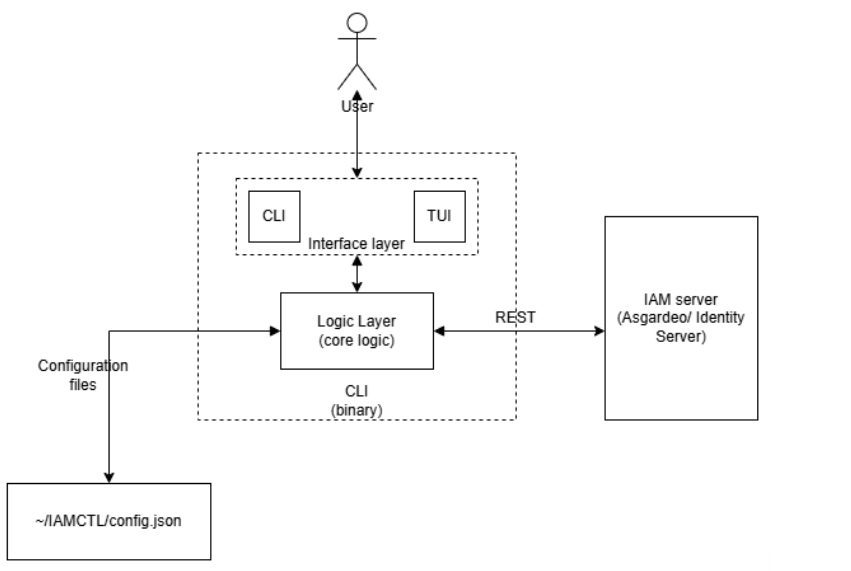
The tool is expected to be distributed as a single binary containing both the CLI and TUI features. At high level the binary will act as a wrapper for Asgardeo REST API endpoints, handling authentication, configuration and error handling.
The logic layer communicates with the Identity Access Management (IAM) server (Asgardeo or identity Server) via REST API calls via the provided endpoints. The configuration for the tool is provided from configuration files (JSON, YAML) and the secrets (client secret and token) will be stored securely (OS keychain). The architecture proposes a global configuration (single config file in a home directory) instead of local config file (creating multiple config files in each working directory).
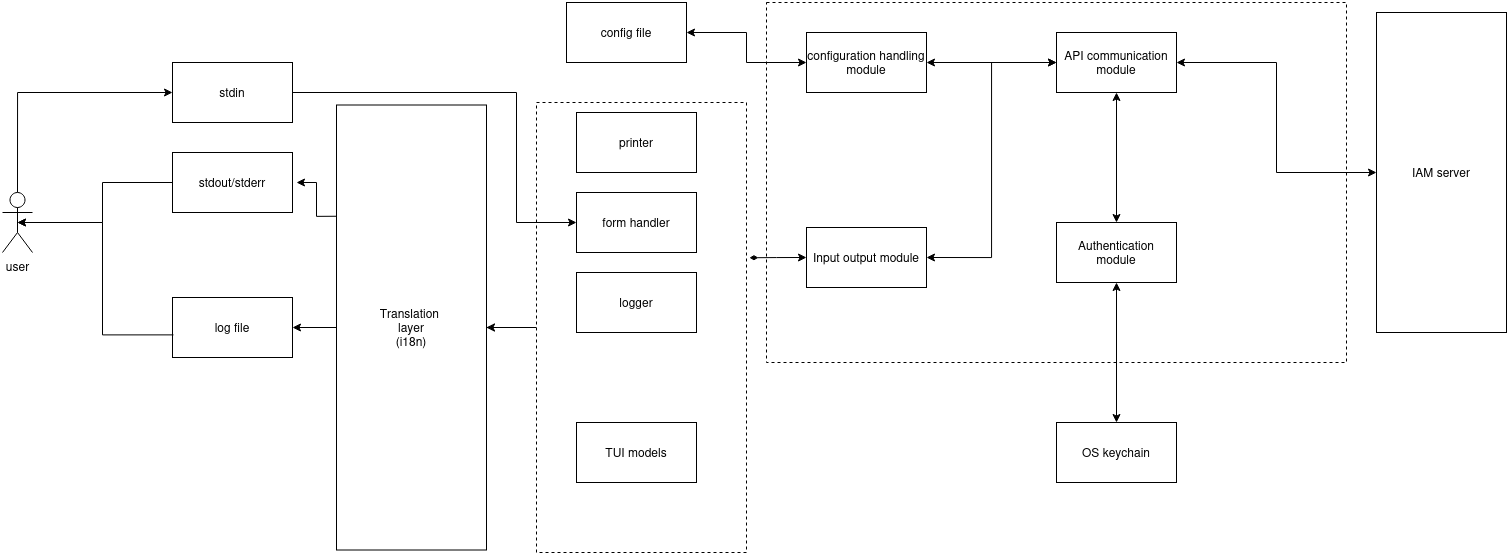
Internal System Layers
To enforce separation of concerns and ensure maintainability, the application is split into four distinct structural layers:
- Presentation (UI) Layer: This is the entry point of the binary, responsible for argument parsing, user interaction, and output formatting. It contains two isolated packages: the CLI module (powered by Cobra) for processing declarative commands, flags, and sub commands, and the TUI module (powered by Bubble Tea and Huh) for rendering interactive terminal views, handling keyboard shortcuts, and capturing form inputs.
- Core Logic Layer: This layer serves as the system's brain, completely decoupled from how the user invoked the command. It validates inputs passed down from the UI layer, enforces business rules, manages the execution workflow, and marshals internal data models into standard formats (Text, JSON, or YAML) before passing them back up to the UI layer for rendering.
- API Client Layer: A dedicated network client responsible for executing HTTP/REST communications with the Asgardeo Server. It encapsulates the complexities of endpoints, maps payload schemas to native Go structs, handles network timeouts, translates HTTP error status codes into human-readable domain errors, and manages token injection for authorized requests.
- Storage & Configuration Layer: This layer handles the persistence of state across CLI invocations. It interfaces with the local file system via Viper to read/write global settings (such as the target organization or tenant URL) and securely talks to the host operating system's native keyring (via Go Keyring) to manage sensitive assets like client credentials and access tokens.
Interface Orchestration: Cobra & Bubble Tea Interaction
The root execution loop always begins within the Cobra framework. When a user runs a command, Cobra handles the initial command routing, flag parsing, and global configuration loading. The interaction between the two interfaces then follows one of two code paths based on the context of the execution:
- Non-Interactive (CLI-First) Mode: For direct commands like
asg apps list --format json, Cobra executes the targeted sub command block. It invokes the Core Logic layer directly, retrieves the data from the API Client layer, formats the raw Go structs into the requested schema, prints the result to standard output (stdout), and immediately terminates the process with a zero exit code. - Interactive (TUI-First) Mode: If the user executes the base interactive command (e.g.,
asg tuiwithout arguments), Cobra acts as a launcher. It initializes the Bubble Tea event loop, giving it full control over the terminal's standard input and output streams. The Bubble Tea model-view architecture then drives the lifecycle of the terminal application. When an action is taken inside the TUI (such as scrolling through a list of applications and pressingEnter), the Bubble Tea update loop triggers a message that invokes the shared Core Logic layer, updating the UI state cleanly without colliding with the outer Cobra scope.
TUI model Architecture
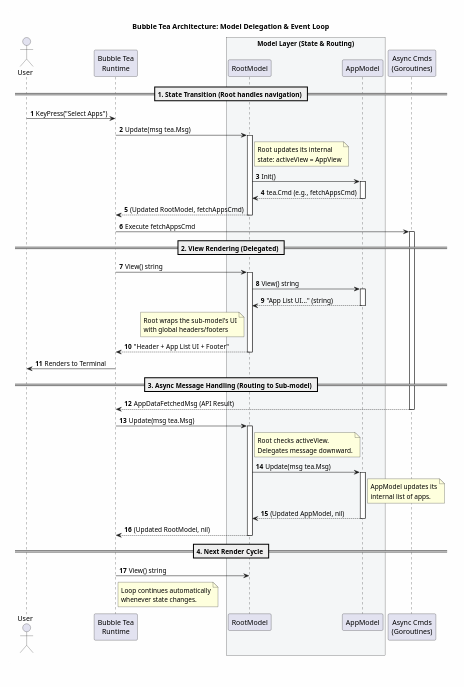
Bubble Tea is based on the Elm architecture. It does not use a traditional MVC (Model-View-Controller) pattern; instead, it uses the Model-View-Update (MVU) pattern.
When building a complex CLI like the Asgardeo tool, putting all logic in one model creates a massive, unmaintainable file. Instead, you use Model Composition, where a Root Model acts as a router for sub-models.
1. The Root Model (The Router)
The RootModel holds the global state (like configuration, session tokens, and the currently active sub-view). It acts as the traffic cop for the application.
- State Tracking: It keeps a property like
activeView(an enum mapping toHome,AppList,UserList). - Holding Sub-Models: It stores instances of your sub-models (e.g.,
appModel,userModel) as fields within its own struct.
2. Delegating Update()
When the Bubble Tea runtime event loop detects an event (a keystroke, a window resize, or an HTTP response), it packages it into a tea.Msg and sends it to the Root's Update(msg) function.
- Global Overrides: The Root first checks for global messages (like
Ctrl+Cto quit, orTabto switch views). - Routing: If the message isn't global, the Root checks its
activeView. If the user is currently managing applications, the Root callsappModel.Update(msg). - Capturing State: Because Go is pass-by-value, the
appModel.Update()returns a new copy of theappModel. The Root model overwrites its ownappModelfield with this new copy. - Bubbling Commands: If the
appModelreturns atea.Cmd(like "fetch more data"), the Root returns that command up to the Bubble Tea runtime to execute asynchronously.
3. Delegating View()
The Bubble Tea runtime calls RootModel.View() to figure out what to draw on the screen.
The Root model doesn't draw the application list itself. Instead, it calls appModel.View(), takes the resulting string, and typically wraps it in global UI components.
For example, the Root might render a global navigation bar at the top, inject the string returned by appModel.View() in the middle, and add global keyboard shortcuts at the bottom.
CLI Architecture
The CLI uses Cobra library to provide the functionality to execute the functions via commands, arguments and flags. It uses Inversion of Control to call the core functionalities when a specific command is typed: it relies on a different type of IoC: Control Flow Inversion, and uses Chain of responsibility to correctly execute the functions according to the subcommands (asg apps list should call the fetchApplications() function)
Printer Class
In the tool the output should be printed in different formats (Colored, non colored, JSON/YAML) and should support verbose mode. Handling these configurations each and every time when the tool needs to output something is redundant, So the single instance of a printer (some object to interface with stdin/stdio) is needed.
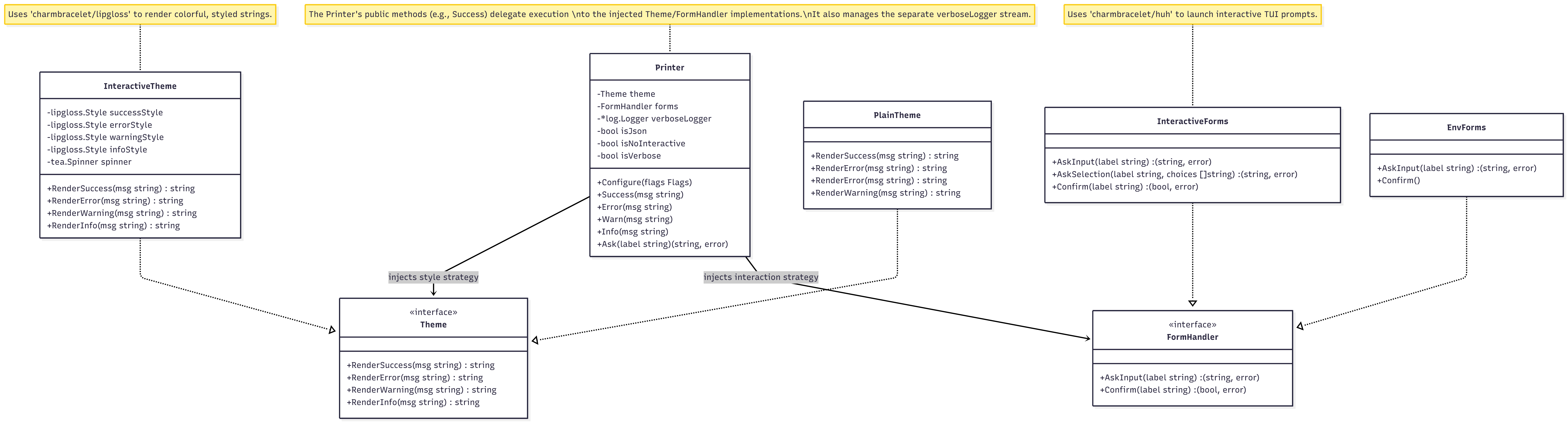
note: this is a draft class diagram to define the structure, concrete implementation may differ
The printer singleton will be defined on command initialization based on user preferences on verbosity and interactivity.
Authentication Flow
The tool will provide two different methodologies to authenticate.
- Login via Asgardeo Account and use the account’s (user’s) privileges - (uses Device code authorization flow)
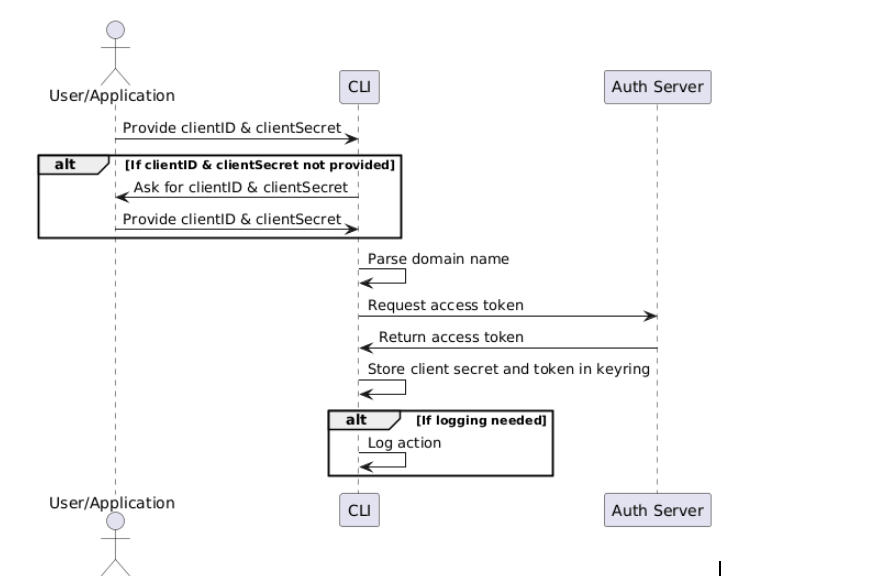
- Login via an application and use the applications privileges (uses client credentials m2m authentication flow)
Login via Asgardeo account
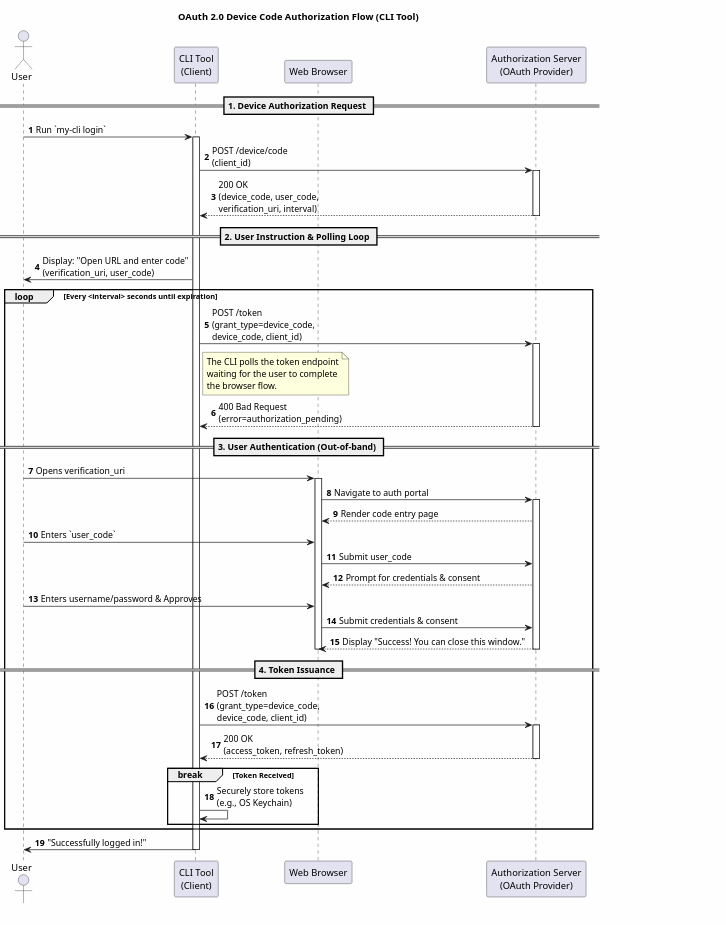
This implementation needs some internal changes to Asgardeo to enable users to login with their Asgardeo account.
Login via an application
Tech Stack
1. Python
Python is often the first language developers reach for when writing scripts, but it has distinct pros and cons when those scripts evolve into full-fledged applications.
- The Good: Incredible development speed. The ecosystem is rich with fantastic libraries like Click and Typer for CLIs, and Rich and Textual for stunning TUIs. It is possible to prototype something beautiful in hours.
- The Bad: Distribution is a hard. It is to be assumed the user has the correct Python environment and dependencies installed, or have to be bundled using tools like PyInstaller, which creates massive executables.
- The Verdict: Excellent for internal tooling or applications where the user's environment in controlled, but poor for distributing tools to the general public.
2. Java
- The Good: Write once, run anywhere (provided the JVM is installed). Huge standard library and excellent multi-threading. Libraries like Picocli make writing CLIs quite pleasant.
- The Bad: The JVM startup time. For a CLI command that needs to execute in milliseconds, a half-second JVM warm-up feels slow. While GraalVM Native Image solves this by compiling Java ahead-of-time into a standalone binary, the setup and compilation process is incredibly complex and resource-heavy.
- The Verdict: Generally overkill and too sluggish for CLI/TUI apps unless building a tool specifically for a Java-heavy ecosystem (like Maven or Gradle).
3. Rust
Rust is the systems programming heavyweight champion, known for zero-cost abstractions and memory safety.
- The Good: speed, microscopic memory footprint, and instant startup times. It compiles down to a single static binary, making distribution easy. The ecosystem is top-tier: Clap is arguably the most powerful CLI parser in existence, and Ratatui is a phenomenal library for building complex, highly performant TUIs.
- The Bad: The learning curve is steep. Fighting the borrow checker just to get a simple terminal tool working can slow down development significantly. Compile times can also be quite long.
- The Verdict: The absolute best choice if the CLI tool needs to do heavy data processing, system-level manipulation, or if maximum performance is a strict requirement.
4. Go (Golang)
Go was designed by Google to be a simple, fast, and highly concurrent systems language. It has accidentally become the undisputed king of modern CLI tooling (Docker, Kubernetes, Terraform, and GitHub CLI are all written in Go).
Why Go is the Preferred Choice for CLI/TUI
Go sits perfectly in the "Goldilocks Zone" for terminal applications. It offers the performance and distribution benefits of Rust, with a development speed much closer to Python. Here is why it usually wins:
1. The Holy Grail of Distribution: Single Static Binaries
When a Go program is compiled, it produces a single, statically linked binary file. There is no JVM to install, no Python virtual environment to configure, and no hidden dependencies. Just send the user the file, they type ./app, and it runs instantly. Cross-compiling for Windows, Mac, or Linux is as simple as setting an environment variable (GOOS=windows go build).
2. Instant Startup Times
Unlike Java or standard Python, Go compiles to native machine code. When a user runs a Go CLI tool, it executes immediately. This responsiveness is critical for command-line workflows where users string together multiple commands using pipes.
3. The Charmbracelet Ecosystem
If there is one reason Go dominates the modern TUI space, it is the Charmbracelet suite of libraries.
- Bubble Tea: An incredibly powerful, functional-style framework (based on the Elm architecture) for building stateful terminal apps.
- Lip Gloss: A library that allows you to style the terminal output using CSS-like rules.
- Bubbles: Pre-built, highly polished TUI components (text inputs, paginators, progress bars, spinners). This ecosystem has made building stunning, responsive, and cross-platform TUIs in Go an absolute joy.
4. Standard Library & Concurrency
CLI tools often need to make HTTP requests, parse JSON, or read files. Go’s standard library handles all of this elegantly without requiring third-party packages. Furthermore, if the CLI needs to fetch data from multiple APIs simultaneously, Go’s goroutines make concurrency trivial to implement compared to Python's asyncio or Rust's futures.
The tool is decided to be built with the Go Programming Language. Additional to native Go libraries, following external libraries will be used,
| Dependency | Purpose | License |
|---|---|---|
| Cobra (v 1.10.2) | Main command execution workflow, providing commands, sub commands and flags | Apache License 2.0 |
| Viper | Configuration management | MIT License |
| Go keyring | Secrets storage | MIT License |
| Bubble Tea Huh Lip gloss log Glamour | TUI event loop handling Stylized inputs UI styling logging Markdown rendering | MIT License Provided under charm ecosystem | | i18n | localization | MIT license |
Tradeoffs
Security vs User Experience
To execute any operation it is needed to send an authenticated REST API request to the server with an access token. This can be implemented in two different ways.
1. Principle of least privileges
Each access token has associated scopes to perform certain actions in the server (internal_app_mgt_delete). To avoid the attack radius in case of token leakage, it is preferred to fetch the token specifically with only the required scope for the current operation before executing the operation using the credentials.
But it reduces the performance of the CLI to send an additional request before each request affecting the performance and increasing the probability of command failure.
It is possible in Machine authentication flow using the Client credentials but without modifications in the server the user may need to login with their credentials for each command making the tool unusable.
2. Store and reuse the token
Once the user authenticates via login command the tool will request for all the available scopes and store the fetched token in the OS keyring securely. It increases the throughput of the CLI by not sending /oauth2/token requests before each requests and token security is assumed since the OS keyring is considered to be secure.
But there is a limit for the length of values stored in the keyring for different OS which may make this implementation fail if JWT tokens are used since they are self contained, to mitigate this it is recommended to use opaque tokens, since their limit does not vary based on the number of scopes requested in the token.
Interactivity vs User Experience
Making the input forms more interactive introduces complications in showing the state of the commands (Ex: previously entered values) and showing the values entered by user in previous steps reduces the interactivity of the tool by hiding the placeholder values and constraining the select or confirm type inputs.
Since more interactivity is provided in TUI mode it is decided to preserve the state-fullness of each command by showing previous inputs throughout the command lifecycle.
Challenges
Handling Race Conditions in Nested Forms
A common challenge when building interactive TUIs is handling nested forms — situations where a smaller, focused input form is presented on top of a larger, still-active parent form.
The problem arises because both forms run in separate goroutines, and both listen for the same keystroke events simultaneously. When a user types, there is no guarantee which goroutine receives the input first. If the background form grabs the keystroke before the active form does, the input is silently consumed and processed somewhere the user never intended — and since the background form has no control over stdout, it cannot update the UI to reflect what happened. From the user's perspective, keystrokes just randomly disappear.
This is a classic race condition: two concurrent processes competing for the same resource (keyboard input) with no coordination between them.
The fix is straightforward in principle: nested forms should never run concurrently. When a child form becomes active, the parent form must stop listening for events entirely. Only one form should own the input stream at any given time. When the child form completes or is dismissed, ownership is handed back to the parent.
In practice, this means treating form activation as a explicit state transition in your Model rather than simply spawning a new goroutine. The active form is a value in your state — and your Update function routes incoming messages only to whichever form is currently marked active.
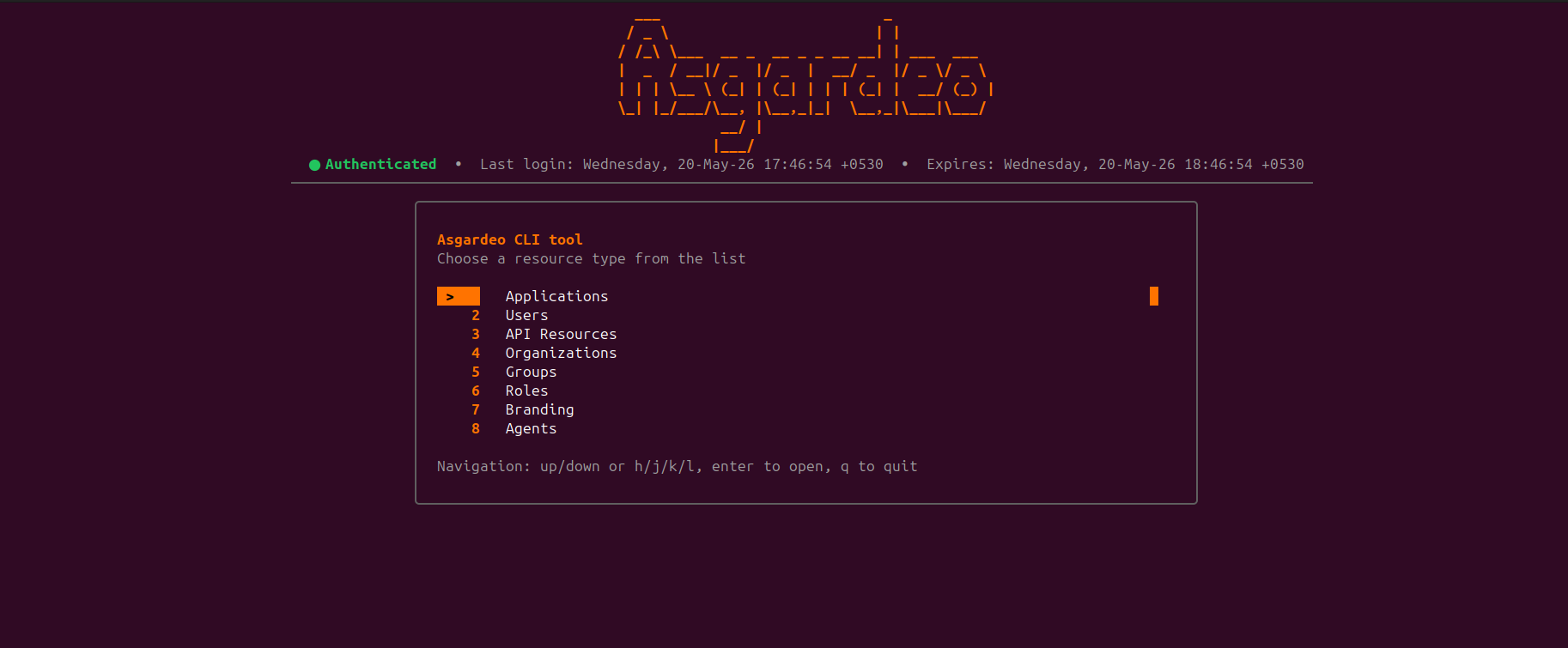
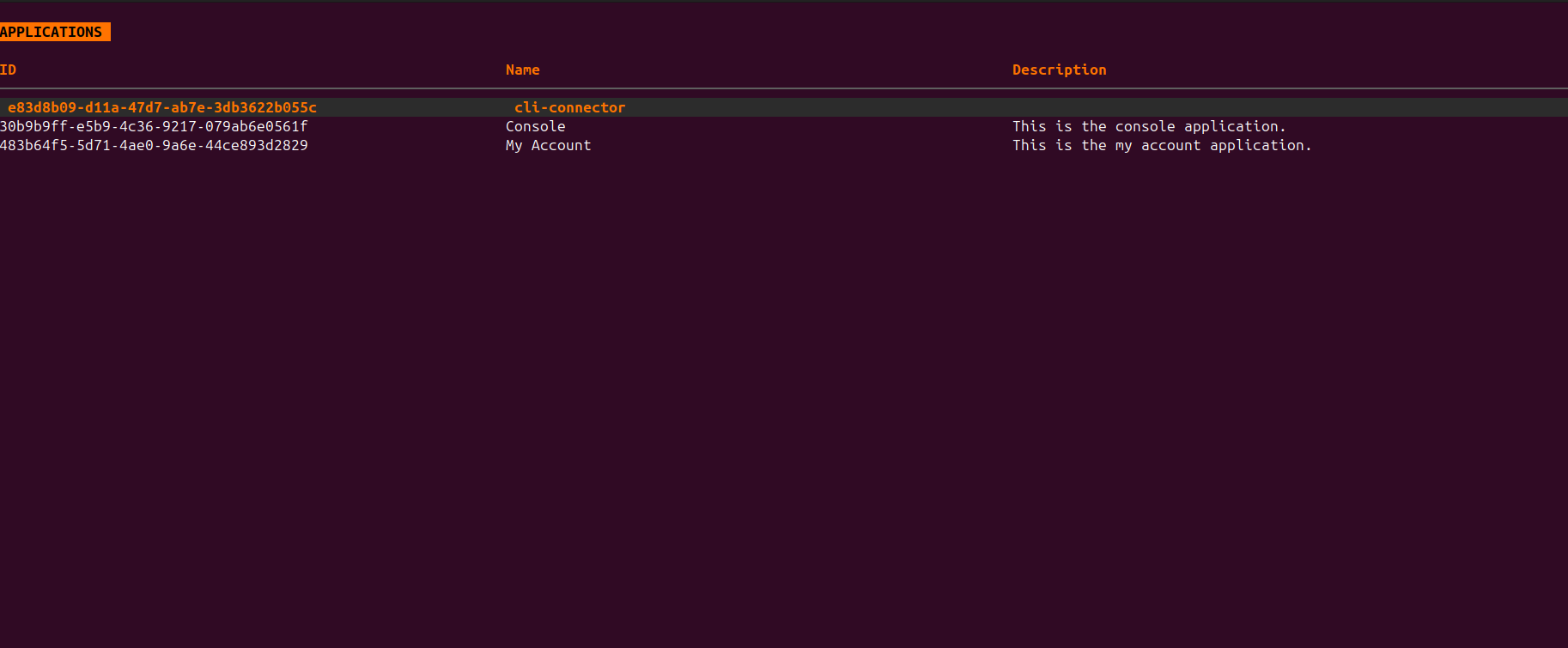
Screenshots
Future Improvements
AI agent skills
Even though the tool is intended to be used by human users the non-interactive CLI mode of this tool can be used by AI agents (Tools like Claude, Codex). In the later period of the project efforts were done to develop a skill for agents to use the CLI and perform actions behalf of the users and incrementally create an init command to perform initial configuration based on the user’s requirement.